How Distributed Teams Can Manage Meeting Notes and Async Decisions in Jira
By The Quely Team — Quely editorial team
The best way to capture meeting notes in Jira is to record decisions and action items and tie them directly on the relevant issue, link or embed notes from Confluence, and preserve async context from Slack/GitHub so it linked with the work item. This supports the workflow of distributed teams who work asynchronously. This ensures that conversations are tied to the tasks and everyone has easy access to the context that shape the most important decisions.
However, most engineering teams don't work this way. They discuss work in Slack threads, GitHub discussions, and scattered async conversations that never make their way into Jira. While they've mastered scheduling meetings and recording calls, they haven't solved for capturing and tying back their async conversations to Jira.
In this article, we discuss how to set up a workflow that connects your async discussions to Jira, so you can preserve context, and everyone on your team can see why decisions were made.
The Reality of Modern Software Development
Here's a scenario that might feel familiar: Your team uses Jira to track work items, diligently records sprint planning sessions, and even has a setup that automatically syncs meeting transcripts to tickets. Everything seems organized and efficient. But then you need to understand why your team chose a particular API design six months ago. The decision wasn't made in a meeting - it emerged from a series of Slack discussions between your backend engineer in Berlin and your tech lead in Boston, spread across three days and two different channels.
This is the reality of modern software development. Critical decisions, important context, and valuable insights don't just happen in scheduled meetings anymore. They emerge from asynchronous discussions in chat threads, pull request comments, and impromptu video calls. Our traditional tools for capturing meeting notes, while excellent at handling structured meetings, weren't designed for this new way of working.
This isn't just about keeping better notes - it's about preserving the context that makes our work meaningful and our decisions traceable. As we discuss this, we'll explore the current meeting note tools, understand why they may not work best for async teams, and discover new approaches that better align with how modern teams actually work.
****
Why Meeting Tools are Not Ideal for Async Decision-Making
Imagine a scenario where your team spent three days debating an API design. Most of this conversation happened on your team communication tool, like Slack, and a decision was reached on that same tool. Six months later, a new engineer asks why you chose that approach, and you are struggling to find how you reached that decision because it's buried in a Slack group chat.
You have a distribution problem. Your async conversations and decisions are not tied to the tasks. Slack conversations stay in Slack, and GitHub discussions are in some archives. The consequence is that new team members pick up tasks without understanding why.
Why Most Tools Don't Work Best for Distributed Teams
Most of your current tools assume decisions happen in meetings. Calendars block time. Notetakers record the meeting and push it into your project management tool. But that's not your exact workflow. You still host a bulk of your decisions async.
When your best decisions live in Slack threads, they're invisible to others and you lose institutional knowledge. You can't build on what you've learned.
How Quely Connects Decisions to Work
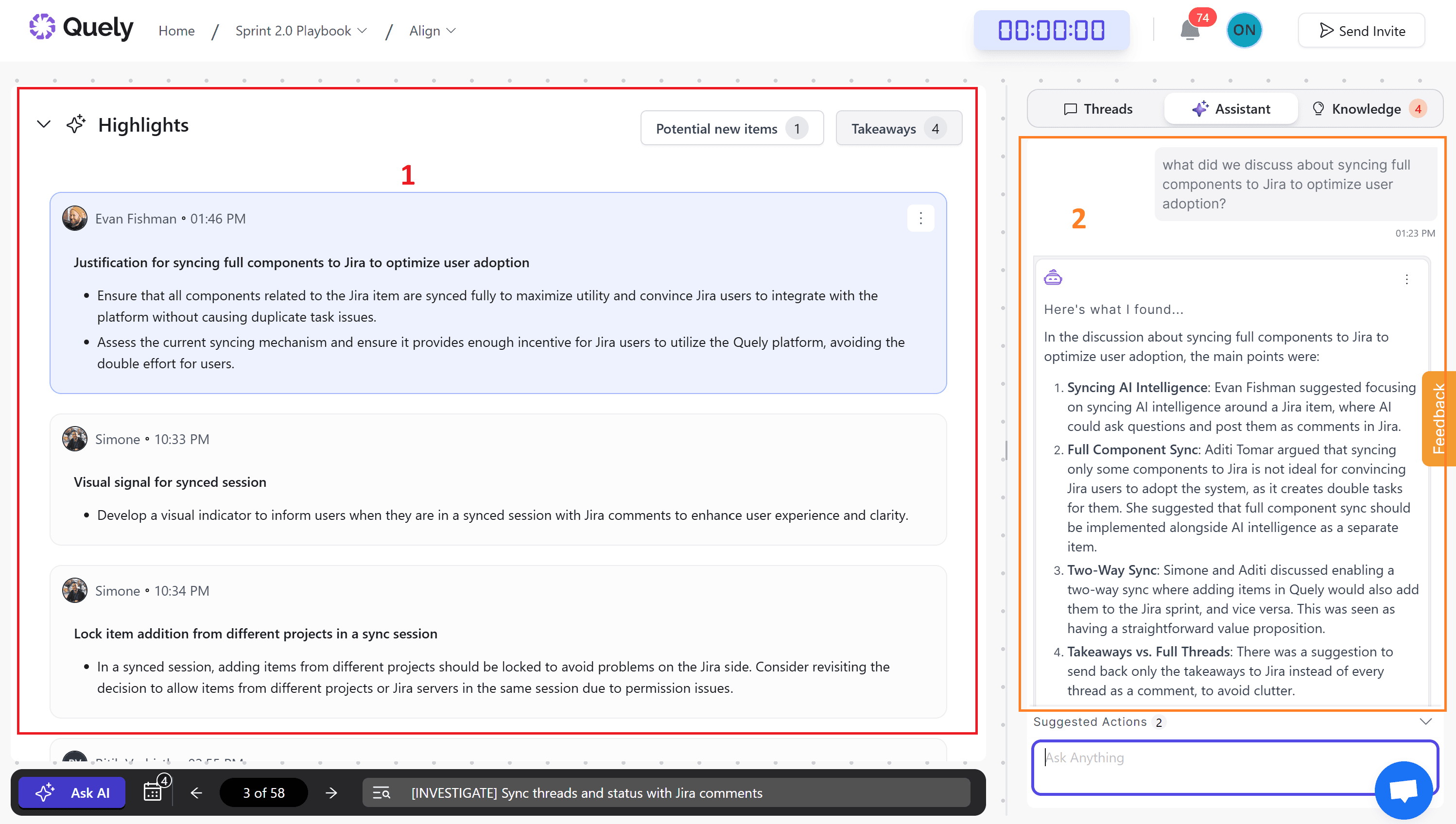
In Quely, a Jira issue can enter a Space as a Work Unit. Related material from connected systems becomes synthesized Context Units, so the team can examine the execution object alongside the decisions, constraints, and evidence that shape it.
Orbit reasons across those Units and makes the most useful context easier to retrieve:
Context Units: synthesized understanding that preserves relevant decisions, trade-offs, and supporting material.
Signals: explicit decisions, questions, risks, action items, dependencies, blockers, assumptions, commitments, and themes.
Orbit: a conversational and analytical interface for asking questions across the connected work and context.
Learn more about Spaces, Orbit, and how Quely supports asynchronous work.
Tools for Capturing Meeting Notes in Jira
Several tools streamline meeting note-taking and integrate with Jira, improving team collaboration and project management. These tools try to improve meeting efficiency by making notes accessible, actionable, and directly linked to project workflows within Jira.
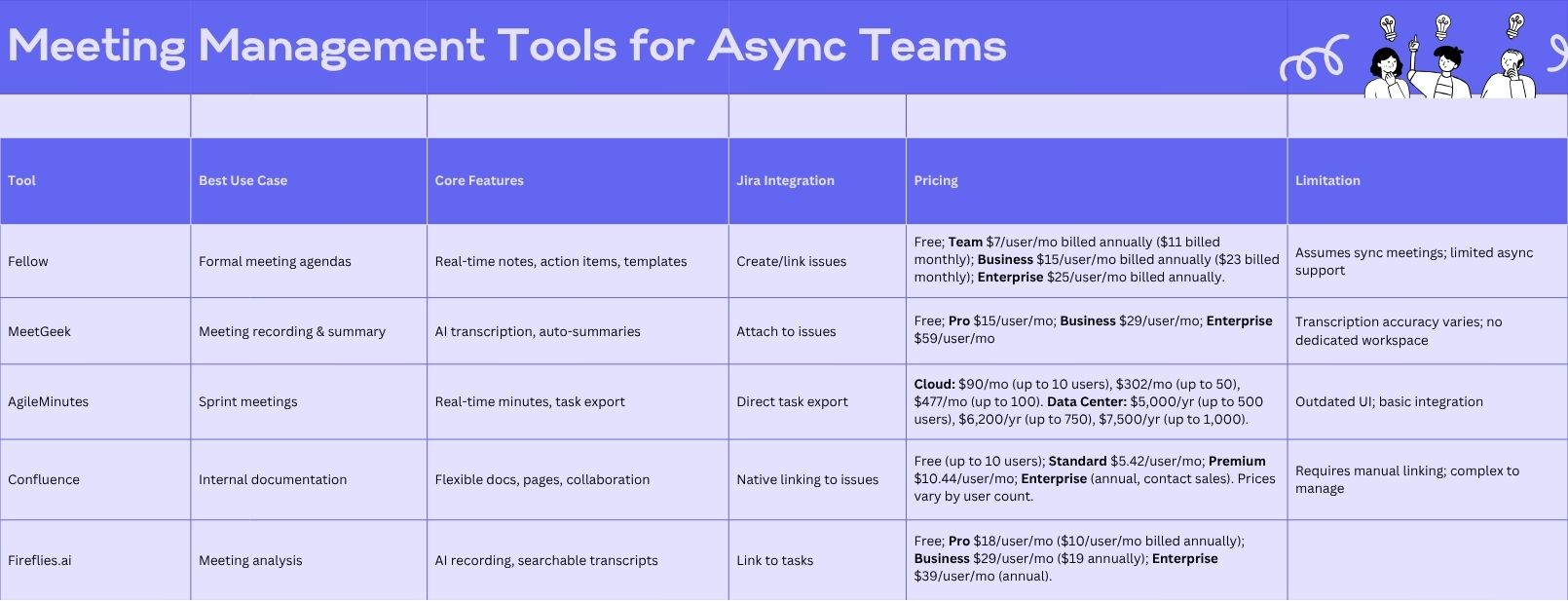
Here's a breakdown of popular tools:
1. Fellow
What it does: Meeting management with structured agendas, real-time collaborative notes, and action item tracking
Jira integration: Users can create and link Jira issues from meeting notes to ensure follow-through.
Pros: Structured agenda templates, real-time collaboration, intuitive interface.
Cons: High pricing, limited Jira field customization.
2. MeetGeek
What it does: AI-powered meeting recording, transcription, and summary automation.
Jira integration: Transcripts and summaries can be attached to Jira issues for reference.
Pros: Saves time with automated transcription and summaries.
Cons: Transcription accuracy varies; limited AI customization.
3. AgileMinutes
What it does: Real-time collaborative meeting minutes with action item tracking.
Jira integration: Direct task export to Jira for immediate tracking.
Pros: Efficient task tracking, straightforward UI.
Cons: Basic Jira integration, outdated interface.
4. Confluence
What it does: Atlassian’s documentation tool used for meeting notes and project documentation.
Jira integration: Natively links meeting notes to Jira issues and allows Jira issue creation from pages.
Pros: Flexible documentation, strong integration with Jira
Cons: Can be complex to manage; requires manual linking.
5. Fireflies.ai
What it does: AI meeting assistant for recording, transcribing, and summarizing discussions.
Jira integration: Transcripts and summaries can be linked to Jira tasks
Pros: Automated note-taking, searchable transcripts.
Cons: Transcription accuracy varies, limited Jira customization.
Limitations of Current Tools for Async Teams
While these tools excel at capturing synchronized meetings, they share common weaknesses that becomes painfully obvious in async work. They're all built around the assumption that important discussions happen in scheduled, real-time meetings.
Here's the reality: your distributed team in Tokyo, Berlin, and San Francisco isn't scheduling a meeting to discuss every implementation detail. Instead, critical technical decisions are being made in Slack threads that span days. Architecture choices evolve through asynchronous GitHub discussions. Product requirements get refined in sporadic Teams messages between a PM and developer in different time zones.
These tools' reliance on live meetings creates several critical problems for async teams:
1. First, they're designed for capturing discrete events - specific meetings with clear start and end times. But async discussions are fluid and continuous. A crucial decision might emerge from a chat conversation that started about one topic and organically evolved into something else entirely. Traditional meeting tools simply aren't equipped to capture these organic, evolving discussions.
2. Second, the integration with Jira, while great for formal meetings, breaks down for async communication. When a key technical decision is made in a Slack thread, there's no straightforward way to preserve that context alongside the relevant Jira ticket. The result? Important context gets buried in chat history, effectively invisible to future team members trying to understand past decisions.
3. Finally, these tools assume a synchronous workflow where teams regularly gather to share updates and make decisions. But for truly async teams, such meetings are rare and often impractical. When your team operates across multiple time zones, forcing synchronous meetings just to utilize these tools defeats the purpose of async work.
The Weaknesses of Common Messaging Platforms For Async Discussions
Most work communication tools, such as Slack and Microsoft Teams, handle quick communication well. But most conversations in these platforms are transient. They’re buried in history or scattered across channels and threads.
You asked a question about API versioning on Tuesday. Someone replies on Wednesday. Three months later, you try to go back to that conversation, but it's buried under dozens of unrelated conversations.
Instead of forcing chat tools to behave like durable documentation systems, connect execution objects with the context needed to understand them. In Quely, Work Units and Context Units can be organized together in a Space, with Orbit available to retrieve and analyze the relevant history.
Quely as an Intelligence Layer for Async Work
Chat platforms are useful for quick communication. Quely addresses a different problem: connecting execution and context across the systems a team already uses, then organizing that information into Spaces.
For example, an engineer reviewing an API choice can inspect the Work Unit, its synthesized Context Units, and the relevant Signals without scheduling a meeting simply to reconstruct what happened.
The model works as follows:
Work Units preserve execution objects and their native properties from connected systems
Context Units synthesize related understanding into a form the team can examine
Orbit surfaces the context that matters when a person returns to the work
Signals make decisions, questions, risks, dependencies, blockers, assumptions, commitments, and themes explicit
Lenses let teams examine the same connected context from different perspectives
Ownership connects responsibility with current commitments, workload, and available capacity
A useful distinction is that chat is a communication stream, while Quely builds a connected model of work, context, Signals, and Ownership.
Quely does not replace every chat, meeting, or source system. It adds an intelligence layer that helps teams recover context, identify what needs attention, and act with clearer Ownership.
If you need to organize asynchronous work and its surrounding context, explore Spaces and Orbit.
Benefits of Connected Work and Context
The value appears when teams can use the same connected context across time zones instead of repeatedly reconstructing it.
1. More deliberate asynchronous review. A product manager can connect a feature Work Unit with its relevant Context Units, allowing teammates in other time zones to review the same material before a decision window closes.
2. Faster context recovery. A teammate joining the work can inspect the relevant Units and Signals to understand what was decided, what remains uncertain, and which evidence informed the choice.
3. Less manual reconstruction. Quely connects rather than replaces source systems, reducing the need to search each one independently when a delivery question arises.
4. Clearer accountability. Ownership makes responsibility, current commitments, workload, and available capacity part of the context surrounding execution.
Conclusion
The way we work has changed, but until now, our tools for capturing work discussions haven't kept pace. While traditional meeting note tools excel at documenting synchronized meetings, they fall short in addressing how modern, distributed teams actually communicate and make decisions.
The challenge isn't just about finding a better way to take notes - it's about acknowledging that valuable discussions and critical decisions don't always happen in scheduled meetings anymore. They emerge from asynchronous conversations that span time zones, cultures, and work schedules.
Instead of trying to retrofit old meeting-centric tools to work for async teams, or relying on chat platforms that were discurssions get buried in threads, it's time to invest in tools that provide a dedicated space for these conversations to happen and remain accessible.