ClickUp Brain Alternatives: 5 Options Compared (2026)
ClickUp Brain is a good choice if your team is ready to run its tasks, docs and chat in ClickUp. Look at an alternative if you want to keep your current task tool, or if you only need AI and do not want to move your work.
By The Quely Team, Quely editorial team
Published .

Which ClickUp Brain alternative fits your team?
Last checked: October 29, 2026.
Here are five alternatives and who each one suits:
- Notion AI: teams whose docs and wiki live in Notion.
- Atlassian Rovo: teams on paid Jira or Confluence Cloud.
- Microsoft 365 Copilot: teams that work in Microsoft 365.
- Glean: large companies that need one search across many departments.
- Quely: product teams that want to keep their current task tool and work on each item with its discussion, documents and meetings in one shared Space.
ClickUp Brain alternatives at a glance
| Tool | Price (checked Oct 29, 2026) | Best for | Main limit |
|---|---|---|---|
| ClickUp Brain | Core starts at $9 per user per month with a Brain² trial. Business starts at $17 with Brain², paid yearly. AI use is metered in credits. | Teams that run their tasks in ClickUp | Search across other apps needs the Enterprise or Max plan. |
| Notion AI | Full AI and Enterprise Search on the Business plan, $20 per member per month, paid yearly | Teams whose docs live in Notion | Enterprise Search needs the Business plan or higher. Confluence is not a listed connector. |
| Atlassian Rovo | Included in Standard, Premium and Enterprise Cloud plans of Jira and Confluence. Credits apply. | Teams already on paid Atlassian Cloud | Standard plans include 25 AI credits per user per month. |
| Microsoft 365 Copilot | Enterprise: $30 per user per month, paid yearly | Teams that work in Microsoft 365 | Needs a qualifying Microsoft 365 license. |
| Glean | Not published. Sold through sales. | Company-wide search across many departments | No public price. IT usually owns the rollout. |
| Quely | Free pilot access. Paid plans will be shared before they start. | Product teams that keep their current task tool | Access is by invitation. You book a walkthrough to start. |
Prices change often. Check each vendor's pricing page before you decide.
What ClickUp Brain does well
ClickUp Brain is the AI built into ClickUp. It can search your workspace, answer questions in AI chats, run agents and take meeting notes. You can choose between several AI models.
On current ClickUp plans, Core includes a Brain² trial and 1,000 AI credits. Business includes Brain² and 1,500 credits. Agents and heavier AI use draw on those credits.
ClickUp Brain works best when ClickUp is your team's main work tool. The AI then has your tasks, docs and chat in one place.
Why teams look for a ClickUp Brain alternative
Teams usually start looking for one of three reasons:
- They do not want to move their tasks. Engineering may live in Jira, Linear or GitHub. Moving every task into ClickUp to get the AI is a big project.
- They need search across other apps. Enterprise Search with connected apps is on the Enterprise and Max plans only.
- Credits are hard to predict. Agents and AI notes use credits, so heavy use can cost more than the plan price.
Notion AI
Notion AI includes an agent, AI meeting notes and Enterprise Search. On the Business plan or higher it can search Slack, Google Drive, GitHub, Jira (beta), Linear and Microsoft Teams.
Choose Notion AI if your specs and wiki already live in Notion.
Skip it if your docs live outside Notion. Notion's strength is its own pages.
Atlassian Rovo
Rovo is included with paid Jira and Confluence Cloud plans. It offers search, chat and agents across Atlassian products and connected apps.
Choose Rovo if your team already pays for Jira or Confluence Cloud on Standard or higher.
Skip it if most of your work lives outside Atlassian.
Microsoft 365 Copilot
Copilot works inside Word, Excel, PowerPoint, Outlook and Teams. Admins can connect Jira, Confluence and GitHub.
Choose Copilot if your team writes, meets and chats in Microsoft 365.
Skip it if you work mostly in Slack and Google Workspace.
Glean
Glean offers search, an assistant and agents across more than 250 connectors. It follows each source tool's permissions.
Choose Glean if you need one search for the whole company.
Skip it if you are one team that needs a quick, low-cost start.
Quely
Quely is for a product team that wants to keep its current task tool. You bring your work items into a Space from Jira, Azure DevOps, GitHub, Linear, monday.com, Trello, Todoist or Wrike. The team then discusses, documents, meets and estimates on each item in one place.
The part that helps most as context grows is Lenses. A Lens shows one type of information across the Space. In our product walkthrough, the product manager opens the actions Lens to see what needs to be done. The risks Lens shows what may need attention. The open questions Lens shows what still needs an answer. There are also Lenses for decisions, opportunities and next steps. So you do not have to read every thread to find the open questions before a review.
The difference from ClickUp Brain is what you move. With ClickUp Brain, the AI works best when your tasks are in ClickUp. With Quely, your tasks stay in Jira or Linear, and the team works on them, with their context, in a Space.
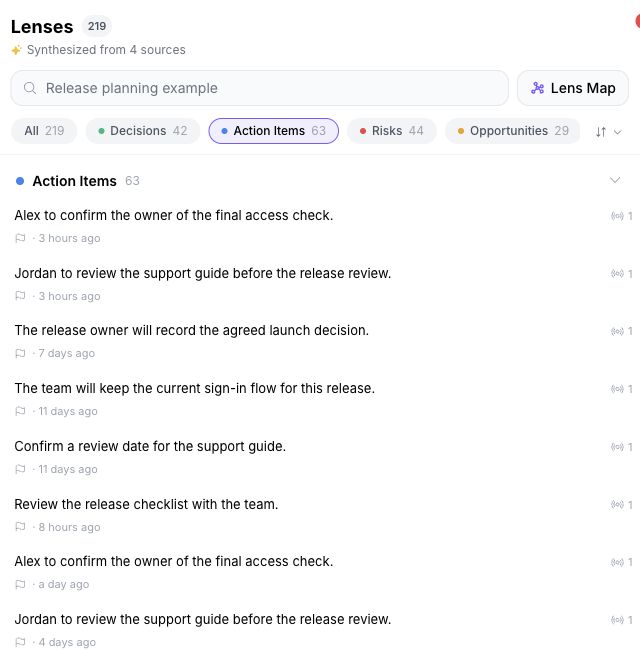
Choose Quely if you want to keep your current task tool and need one place for each item's discussion, documents and meetings.
Skip it if your team is happy to run everything in ClickUp. Then ClickUp Brain keeps all your work and AI in one product.
Quely offers a free pilot. You start with one sprint, release or initiative. Book a walkthrough to set it up.
How to choose in one week
- Pick one work item where the requirement changed recently.
- Find the document and the conversation that explain the change.
- In each tool, ask: "What changed, why, and what is still open?"
- Check each answer against the original records.
- Count what each option needed you to move, connect or pay for.
How we compared
The Quely team wrote this comparison. We used each vendor's public pricing and product pages, checked on October 29, 2026. We did not run hands-on tests of the other products. Features and prices vary by plan, so confirm them with each vendor.
Frequently asked questions
How much does ClickUp Brain cost?
Core starts at $9 per user per month with a Brain² trial. Business starts at $17 with Brain², paid yearly. Each plan includes a pool of AI credits. Extra credits cost $10 per 10,000. Older plans may still have Brain as an add-on.
Does ClickUp Brain search outside ClickUp?
Yes. Enterprise Search can search connected apps such as Google Drive, Slack and GitHub. This needs the Enterprise or Max plan.
Do I have to move my tasks to use Quely?
No. Quely brings in work items from Jira, Azure DevOps, GitHub, Linear, monday.com, Trello, Todoist and Wrike. Your tasks stay in the tool you use today. In Quely, the team keeps each item's discussion with the item.
Does Quely connect to ClickUp?
No. ClickUp is not one of Quely's connections today.
Related reading
Find more Quely articles
Choose Quely as a preferred source in Google Search.
Prefer Quely on Google