Unblocked Alternatives for Product and Engineering Teams
Unblocked is a strong choice if your main goal is to give developers and AI coding agents better context from code, pull requests, tickets and chat. Look at an alternative if you need code search at very large scale, a lower price, or one place where product managers and engineers both work on the item.
By The Quely Team, Quely editorial team
Published .

Which Unblocked alternative fits your team?
Last checked: October 29, 2026.
Here are four alternatives and who each one suits:
- Sourcegraph: large engineering teams that need code search across many repositories.
- Glean: companies that want one AI search across every department, engineering included.
- Dosu: small engineering teams that want docs kept up to date as code changes.
- Quely: product and engineering teams that want each work item, its discussion, documents and meetings in one shared Space.
Unblocked alternatives at a glance
| Tool | Price (checked Oct 29, 2026) | Best for | Main limit |
|---|---|---|---|
| Unblocked | $29 per user per month paid yearly, or $35 monthly. 21-day free trial. | Developers and AI coding agents | No free plan. SSO and audit features need Enterprise. |
| Sourcegraph | Enterprise only, from $16,000 per year | Code search across very large codebases | Answers from code only. High minimum price. |
| Glean | Not published. Sold through sales. | Company-wide AI search, including code | No public price. IT usually owns the rollout. |
| Dosu | Free for public repositories. Pro $16 per month, billed $192 yearly. | Small teams that want docs to stay current | Fewer connectors. Jira is not listed. |
| Quely | Free pilot access. Paid plans will be shared before they start. | Product managers and engineers working on the same items | Not a code review or coding-agent tool. Access is by invitation. |
Prices change often. Check each vendor's pricing page before you decide.
What Unblocked does well
Unblocked connects code hosts (GitHub, GitLab, Bitbucket, Azure DevOps), CI tools, docs (Confluence, Notion, Google Drive), issue trackers (Jira, Linear) and chat (Slack, Microsoft Teams). Developers can ask it questions in a web app, a Mac app, Slack or Teams. Coding agents such as Claude Code, Cursor and Copilot can use it through MCP or a CLI. It also does AI code review on GitHub and GitLab.
So Unblocked is built for the moment a developer or an agent writes code.
Why teams look for an Unblocked alternative
- They need code search at scale. Very large codebases may need a dedicated code search tool.
- Price. There is no free plan, and a team of 20 costs about $580 a month on the yearly plan.
- The question is not about code. A product manager may need to know why a release slipped. That answer often sits in a discussion or a meeting, not in the code.
Sourcegraph
Sourcegraph searches code across GitHub, GitLab, Bitbucket, Azure DevOps, Perforce and more. Its Deep Search answers questions about the codebase. You can use it in the web app, through MCP and a CLI, or in Slack on Enterprise plans.
Choose Sourcegraph if you have a very large codebase across many repositories.
Skip it if you need answers from docs, tickets or chat. Sourcegraph answers from code.
Glean
Glean searches across more than 250 connectors, including GitHub, GitLab, Jira, Confluence and Slack. Developers can use it in Cursor, VS Code and Claude Code through MCP.
Choose Glean if your company wants one AI search for every team, and engineering is one of them.
Skip it if you are one engineering team that wants to start quickly.
Dosu
Dosu keeps docs current as code changes. It answers questions in Slack and Teams and opens pull requests to update docs on GitHub and GitLab. Private repositories and Slack, Confluence and Notion need the Pro plan.
Choose Dosu if you are a small team and out-of-date docs are your main problem.
Skip it if you need Jira or Google Drive. They are not on Dosu's connector list.
Quely
Quely is for the moments before and around the code: planning, discussion and decisions. Product managers and engineers work on the same items in a Space.
An engineer on our own team described the problem this way. A bug was discussed in Slack, then turned into a Jira ticket. About two weeks later, at the start of the sprint, it went to a different developer who had no context. That developer had to open Slack, Figma and other apps, one tab after another, to find what was said. Our engineer said this kind of searching took 15 to 20 minutes every day.
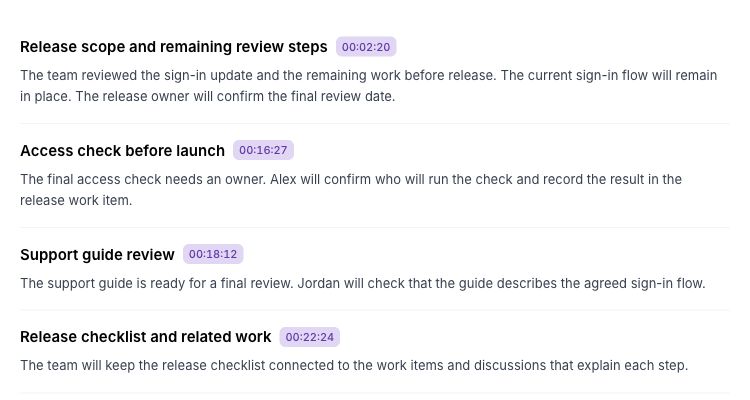
In Quely, that ticket comes in from Jira. Its thread holds the team's discussion. The Slack link and design files sit on the item as attachments. Related work is linked. The engineer asks Orbit, Quely's AI, to summarize the discussion before he starts. If something needs a call, the team meets from the item, and Orbit can join the Google Meet, Teams or Zoom call. The meeting page then shows the summary, decisions, action items and next steps.
The difference from Unblocked is who works in it. Unblocked serves developers and coding agents. Quely serves the product manager, the designer and the engineer on the same item.
Choose Quely if your delays come from lost decisions and discussions, and product and engineering need the same picture.
Skip it if you need code review or context for AI coding agents. Quely does not do either.
Quely offers a free pilot. You start with one sprint, release or initiative. Book a walkthrough to set it up.
How to choose in one week
- Pick one work item that has a code change and a related product decision.
- Ask the technical question: "Why was this built this way?"
- Ask the product question: "What does this decision mean for the release?"
- Have the engineer and the product manager each check the answers.
- Choose the tool that answers the question your team asks most often.
Some teams need both kinds of answer. A code-context tool and Quely can sit side by side.
How we compared
The Quely team wrote this comparison. We used each vendor's public pricing and product pages, checked on October 29, 2026. We did not run hands-on tests of the other products. Features and prices vary by plan, so confirm them with each vendor.
Frequently asked questions
How much does Unblocked cost?
Unblocked costs $29 per user per month paid yearly, or $35 paid monthly. It offers a 21-day free trial with no card. Enterprise pricing is custom.
Does Quely do code review?
No. Quely does not review code or supply context to AI coding agents. It brings in work items from tools such as Jira, GitHub and Linear, so the team can discuss and plan them in one place.
Can product managers and engineers work together in Quely?
Yes. They work on the same items in a Space, with threads, documents, diagrams, meetings and estimates next to each item.
Does Quely connect to GitHub?
Yes. Quely brings in GitHub issues as work items.
Related reading
Find more Quely articles
Choose Quely as a preferred source in Google Search.
Prefer Quely on Google