Asynchronous Standups: What It Is, Benefits, and How to do Them Right
If your team can share status without meeting at the same time, use a shared update window, clear prompts, and a named person to follow up on blockers. Link updates to the work. Keep live discussion for decisions that need it, and retain the Daily Scrum when using Scrum.
 By The Quely Team, Quely editorial team
Published . Last updated .
How do you run effective asynchronous standups?
Run an async standup with a shared update window, clear prompts, and a named person to follow up on blockers. Use written or recorded updates for status, then hold a live discussion when a decision needs the people involved.
Key takeaways
- Link each async update to the work and explain what changed.
- Set an update window and agree who follows up on blockers.
- Use examples to show the detail a useful update needs.
- Keep live discussion available when a decision needs the people involved.
What is an async standup?
An async standup is a team check-in where people share progress, plans, and blockers without meeting at the same time. Updates are written or recorded within an agreed window. The team reviews them, asks follow-up questions, and assigns action when work needs help.
An async check-in is not the same event as the Daily Scrum defined in the Scrum Guide. Teams using Scrum can use written updates to prepare for daily planning.
How does an async standup work?
Each person posts progress toward the team goal, the next step, and any help needed. Link the relevant work item and explain what changed. The team reviews updates within an agreed window and follows up where work needs a decision or support.
What Are The Benefits of Async Standups?
In 2024, researchers at Duke and Vanderbilt University conducted research titled Breaking the Flow: A Study of Interruptions During Software Engineering Activities. The study examines interruptions during software work. It does not establish that replacing the Daily Scrum improves results. Test whether written status updates help your team protect focus.
If you are considering async standups, review these four possible benefits. Check whether they apply to your team.
1. Better updates: A live standup has limited time, but there is no universal limit of 15 seconds per person. Written updates let people add links and explanation within an agreed window. Check whether the added detail helps readers act.
Link relevant pull requests, documents, and work items when they explain a change. Keep the update short enough to read. A written update can still leave questions that need discussion.
2. Searchable project history: Written updates can provide a record of progress. That record still needs useful detail, access, retention, and links to decisions. It is not automatically complete project documentation.
Link each update to the relevant work item, document, or discussion. Readers need the explanation behind progress as well as the status.
3. Inclusive Participation: For a distributed team, one benefit of asynchronous standups and even async work in general is that it's inclusive. It allows you to accommodate global time zones without sacrificing alignment. If you're part of a distributed team, you know that it's difficult to find an optimal time that works for everyone. 9am PT might be midnight in India or in the middle of the day in European time zones when people are deep in work and don't need a distraction.
But with asynchronous standups, you can reduce the need for a shared meeting time, allowing each team member to contribute at a convenient time, still within the standup window.
4. Reduced meeting fatigue: Compare the scheduled and actual length of your meetings before changing the process. Microsoft’s 2021 small laboratory study of video meetings compared meeting conditions with and without breaks. It does not establish that async standups improve every team’s productivity.
Test whether written status updates reduce avoidable calls and interruptions. Keep the coordination and live discussion the team needs.
4 Signs that You Should Switch to Async Standups
Recognizing when synchronous standups are hindering rather than helping your team requires looking beyond surface-level participation to understand the real impact on productivity and team dynamics. Here are the clear warning signs that indicate it's time to make the switch:
1. Updates Are a Repetition of What's Already in Jira or GitHub: When your updates are the same as what's in your project management tool, it is an indicator that it's time to move async. It's not worth interrupting time for deep and focused work to repeat what's already in Jira tickets or GitHub.
2. People Regularly Join Late, Leave Early, or Seem Distracted: If you notice that many people join your standups late, multitask, or are distracted, it's another sign that you have to rethink your standup format. What this shows is that most people don't find the standup engaging enough to require their full attention.
3. Important Discussions Happen After the Official Meeting Ends: If you notice that the valuable coordination and problem-solving conversations often occur in "parking lot" discussions, sidebar conversations, or follow-up meetings after the formal standup concludes, then there's no need to drag everyone into a meeting where they'll simply repeat what's already in the project board. What your focus should be is enabling your team to coordinate better and work through blockers faster.
4. Time Zone Conflicts Create Participation Inequality: When time zone differences become an issue, one thing you'd notice is that some team members consistently join at inconvenient times, participate less due to scheduling constraints, or miss meetings entirely due to time zone conflicts. You might observe that certain team members provide brief updates because they're joining late at night or early in the morning. If this is the case, trial an update window that suits the affected people. Remember, to get the best out of your meeting, you need everyone to participate. If time zones are hindering this, then explore another option that serves your team.
How to Conduct Async Standups
Implementing async standups is more than creating a dedicated Slack channel or signing up for a standup tool and asking your team to write their updates instead of joining a meeting. If you want async standups to really work and not just be status reports in a different channel, you need to set expectations and design a process that makes it easy to meet expectations. Here's a simple framework you can follow to conduct async standups that improve alignment.
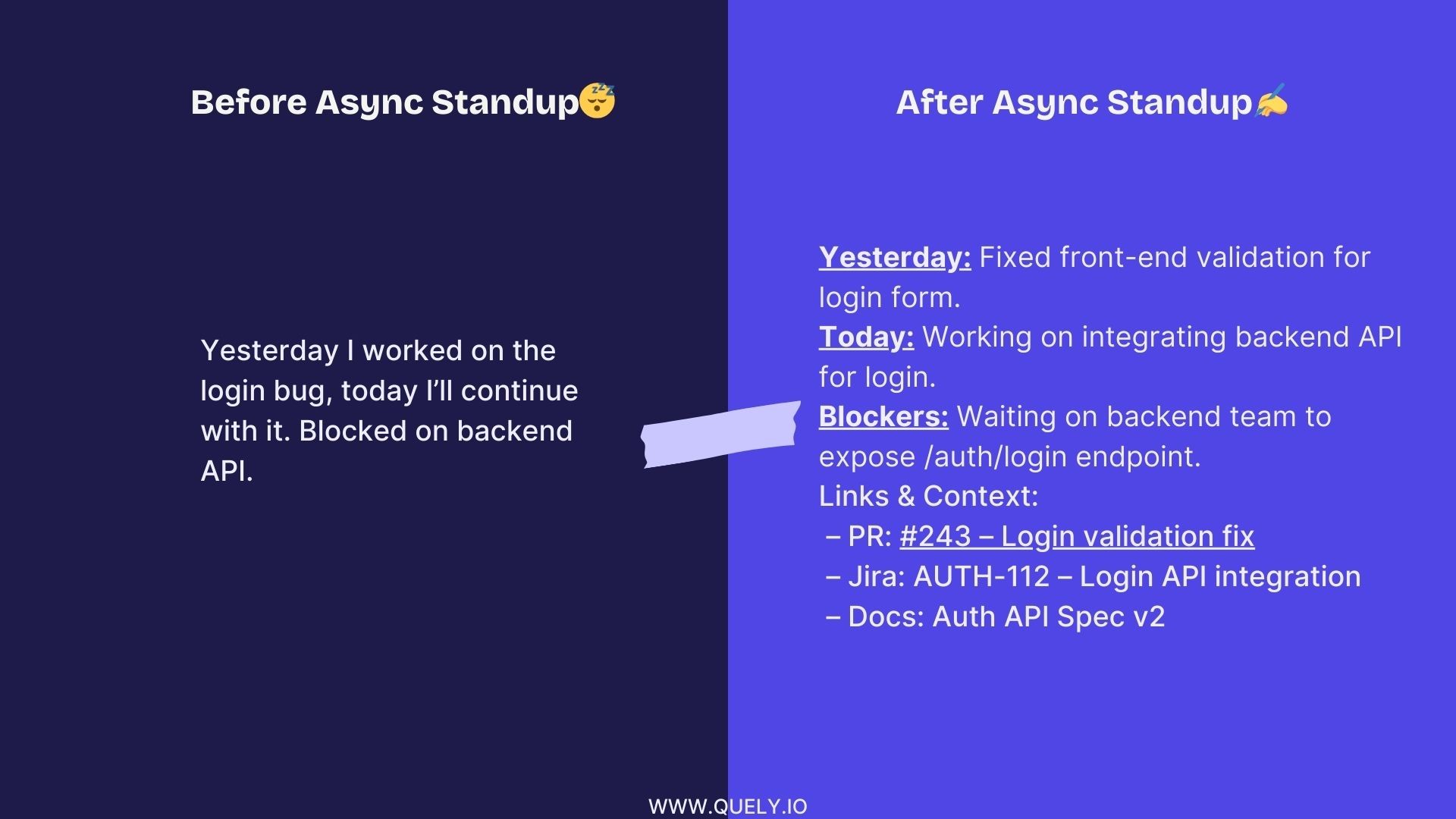
1. Create a structure for your updates: When thinking about a structure for your updates, you want to balance comprehensiveness with efficiency. This means that you want to provide a structure that provides complete information that minimizes follow-up questions. But at the same time, you don't want to overwhelm people so that providing their update becomes such a tedious task that synchronous meetings seem like a better option. Here's how to create a standup structure that goes beyond the usual "yesterday, today, blockers" format:
What I accomplished: This should include context about the work. Instead of "Fixed the authentication bug," encourage updates like "Resolved authentication timeout issue by implementing connection pooling. This pattern should be applied to other service connections to prevent similar issues."
What I'm working on next: Just like the previous point, this should include priorities, expected timeline, and potential dependencies. Rather than "Working on user dashboard," your update should explain "Implementing user dashboard responsive design with focus on mobile performance. Planning to complete wireframe implementation by Thursday, then coordinate with design team for final review before development completion."
Blockers and support needed: This section should specify what type of help is needed and from whom. Instead of generic "blocked on API," an ideal update should say "Waiting for user service API documentation update from backend team. Specifically need clarification on pagination parameters and error response format. Can proceed with UI implementation using mock data until documentation is available."
2. Establish Quality Standards with Examples: After creating a structure for your standup format, create a template that shows a high-quality update versus a low-value one. This gives your team an understanding of the level of detail that's helpful versus overwhelming.
3. Set Expectations around Timing: One of the concerns people have about async work is around response times. Most people worry that if they start communicating asynchronously, it will take more time to get the information they need. If this is your concern, establish a window for sharing updates. For example, if your async standup holds by 3:30 PM, you can create a standup window where everyone is expected to send their updates between 3:30 PM - 4 PM.
4. Create Accountability: In synchronous standups, people join the meeting at the scheduled time, but that's not the case in async standups. It relies on individual discipline and commitment. Even in high-trust teams with significant autonomy, you still need structures that ensure accountability. Accountability in this context means that everyone submits their updates within the agreed timeframe and follows the format. Without an agreed process, participation may become uneven. This undermines the async standup. One thing you can do is create some kind of automation that sends reminders at the start of the standup window as well as at the end, reminding people who haven't submitted their updates to do so.
5. Choose the right tool: Use the tool that supports your update process. Check report access, history, reminders, and plan limits before adopting it.
Compare tools for async updates
| Tool | Best for | Main strength | Main limit | Pricing (public) |
|---|---|---|---|---|
| Slack | Teams that already share updates in chat. | Searchable channels and threads. | Free history is limited to 90 days. | Free plan; Pro US$7.25 per user/month, billed annually |
| Geekbot | Recurring check-ins in Slack or Teams. | Scheduled questions and shared replies. | A person must follow up on blockers. | Free for up to 10 users; see paid plans |
| DailyBot | Check-ins across supported chat platforms. | Private-chat answers and shared reports. | Confirm report access and plan limits. | Free Starter; Essentials US$2.40 per active user/month; check billing terms |
| Standuply | Teams that need several Agile routines. | Standups, retrospectives, and planning poker. | Each process needs setup. | Free Starter for 3 users; see paid plans |
| Linear | Developer teams keeping updates near issues. | Issues, cycles, and estimates. | The Free plan has an issue limit. | Free plan; Basic US$10 per user/month, billed yearly |
| Jira | Teams already using Jira for their work. | Backlogs, sprint boards, and reports. | Workflows need clear administration. | See vendor site |
| Notion | Teams keeping written updates near documents. | Pages and databases for shared updates. | A template needs team upkeep. | Free plan; see paid plans |
Pricing and features from public vendor pages, checked October 2026.
Slack
Best for: Teams that already share updates in chat.
Searchable channels and threads. Free history is limited to 90 days.
Geekbot
Best for: Recurring check-ins in Slack or Teams.
Scheduled questions and shared replies. A person must follow up on blockers.
DailyBot
Best for: Check-ins across supported chat platforms.
Private-chat answers and shared reports. Confirm report access and plan limits.
Standuply
Best for: Teams that need several Agile routines.
Standups, retrospectives, and planning poker. Each process needs setup.
Linear
Best for: Developer teams keeping updates near issues.
Issues, cycles, and estimates. The Free plan has an issue limit.
Jira
Best for: Teams already using Jira for their work.
Backlogs, sprint boards, and reports. Workflows need clear administration.
Notion
Best for: Teams keeping written updates near documents.
Pages and databases for shared updates. A template needs team upkeep.
When the standup is not the problem
A status update can leave questions unanswered when the decisions and context behind the work sit across tools, meetings, and people. Record what was decided, why, and which work it affects with this decision log template for product teams.
Common Challenges of Async Standups and Their Solutions
1. Missed or Incomplete Updates
Challenge: Team members may forget, overlook, or neglect to submit their daily standup updates, undermining team transparency and coordination.
Solution: Use automated reminders to remind everyone to share their updates. Even if you're not using Slack as your standup tool, push reminders to Slack where everyone can see it and act on it.
2. Blockers Not Addressed Promptly
Challenge: Unlike in live meetings, where you can stay behind to resolve blockers, in async standups, if no one is reading the updates, important issues might go unresolved for a long time.
Solution: Encourage team members to flag blockers clearly and prompt managers to actively follow up. Another way to ensure this is not an issue for your team is to ensure everyone reads through the updates. If no one is reading the updates, then they may not know when they are needed to resolve blockers. Also, set up SLAs for when issues should be resolved.
3. Decreased Team Connection and Engagement
Challenge: Lack of face-to-face interaction can make async standups feel impersonal, reducing engagement and eroding team culture.
Solution: Build in team-building questions, encourage comments and reactions, and occasionally supplement async standups with short synchronous check-ins or virtual social sessions.
4. Poor Participation or Engagement
Challenge: It's easy to ignore notifications or feel disconnected from the standup process. Also, team members may not read each other's updates, missing important information, which defeats the purpose of the standup.
Solution: Set clear expectations about the importance of participation, make updates visible, and use engaging prompts. Use tags (like #blocker) to highlight pressing topics.
5. Inconsistent Update Quality
Challenge: Without structure, updates can be too vague or detailed, making them hard to interpret.
Solution: We touched on this in a previous section. Use a standardized template for updates and provide guidance on what details to include.
6. Time Zone Coordination
Challenge: Distributed teams may struggle with simultaneous deadlines.
Solution: Set a daily standup time that overlaps with most team members' working hours. For example, if your team spans Europe, Africa, and North America, try a window like 8am–2pm UTC, so everyone is awake and working during some part of it. Also, use an update window. Instead of a single deadline, create an "update window": a span of several hours during which standup responses can be posted. This gives team members flexibility while ensuring updates are timely for everyone.
FAQs About Async Standups
Question 1: What is an async standup?
Answer: An async standup (asynchronous standup) is a meeting alternative where team members share updates via text, tools, or recordings instead of live calls.
Question 2: What are the benefits of asynchronous standups?
Answer: They can support written updates across time zones. Check participation, follow-up, and time spent in your own team.
Question 3: How do you run an effective async standup?
Answer: Set a structure for updates, establish quality standards, define a posting window, use reminders, and choose the right tool.
Question: What tools are best for async standups?
Answer: Dedicated bots such as Geekbot, DailyBot, and Standuply collect check-ins. Jira and Linear keep updates close to tasks. Choose based on the workflow you need.
Key Takeaway
Async standups let people share updates within an agreed window. Review the answers, assign follow-up, and keep live discussion for decisions that need it. Teams using Scrum should retain the Daily Scrum.
Ready to explore asynchronous work? See how Quely connects work, context, Signals, and Ownership across the systems your team already uses.
What changed (October 2026): Added key takeaways, a comparison table, public pricing sources, and best-for labels. Updated Quely positioning and separated it from tool comparisons.
Find more Quely articles
Choose Quely as a preferred source in Google Search.
Prefer Quely on Google