Decision log template for product teams, and where each decision should live
A product decision log needs seven columns: date, decision, owner, options turned down, reason, linked work, and status. Copy the template, put a one-line summary of each decision on the ticket or epic, and link it back to the log. Capture decisions from meetings and chat on the same day.
By The Quely Team, Quely editorial team
Published .

What goes in a product decision log, and where should it live?
How many tabs do you have open right now? If you manage a product, one is probably a ticket, one is a spec, and one is a Slack thread where a decision was made.
You made that decision three weeks ago. It was in a meeting, then a Slack thread, then a comment on the ticket. Now an engineer asks, "Why are we doing it this way?" And you explain it again.
The short answer: a product decision log needs seven columns: the date, the decision, the owner, the options you turned down, the reason, links to the work it changes, and a status. Copy the template below. Then put a one-line summary of each decision on the ticket or epic, with a link back to the log. Engineers read what sits next to their work. They rarely go looking in a separate document.
Key takeaways
- A decision log needs seven columns: date, decision, owner, options turned down, reason, linked work, and status.
- A decision is only useful if the person doing the work can find it in under a minute.
- Tickets are good for "what". They are bad for "why". Comments get buried when the issue closes.
- A PRD holds the "why" well, but engineers often skim it once and go back to the ticket.
- A decision log works when every entry links to the work it affects, and the work links back.
- Most decisions are made in meetings and chat. Capture them there, the same day, or they are lost.
What counts as a product decision?
A product decision is any choice that changes what the team builds or why. Examples: cutting a feature from a release, picking one user over another, changing an acceptance rule, or delaying a launch.
Small choices also count when someone will ask about them later. A good test: if an engineer could reasonably ask "why?" in a month, write it down.
What should each decision log entry include?
Keep each record short. Five fields are enough for most teams:
- The decision, in one sentence.
- The date, and who made the call.
- The options you considered and turned down.
- The reason, in two or three sentences.
- Links to the tickets, docs, and meeting notes it affects.
Public decision log guides list the same core fields. For example, monday.com's guide names "key choices, rationale, owners, alternatives, action items, and review triggers" (source, checked October 2026).
Decision log template
This table puts the five things above into columns, with the owner and a status split out. Copy it into your docs tool or a spreadsheet. Add one row per decision. Put the newest decision at the top.
| Date | Decision | Owner | Options turned down | Reason | Linked work | Status |
|---|---|---|---|---|---|---|
| YYYY-MM-DD | One sentence | Name | Option A, option B | Two or three sentences | Ticket, doc, and meeting links | Open, decided, or changed |
| Example: 2026-10-14 | Ship the first release with email sign-in only | Product manager | Add social sign-in now. Delay the release. | The security review needs more time. Email sign-in is enough for the first release. | Login epic, security review notes | Decided |
Status tells the reader if the decision still holds. When a decision changes, do not delete the row. Mark it "changed" and add a new row with the new decision and the date.
Where can product decisions live? A comparison
| Place | Good at | Weak at | Best for |
|---|---|---|---|
| Ticket or issue comments (Jira, Linear, Azure DevOps, GitHub Issues) | Right next to the work. Engineers see it. | Gets buried in long threads. Hard to find once the issue closes. Hard to see one decision that spans many tickets. | Small decisions that affect one ticket |
| PRD in a docs tool (Confluence, Notion, Google Docs) | Holds the full "why", the user problem, and the scope. | Engineers often skim it once. It drifts out of date when plans change. | The big picture for a feature or release |
| Decision log (a doc, table, or template) | One list of every decision, with dates and owners. | Only works if people keep it up. Often lives far from the tickets. | Product leads who need an audit trail |
| Decision records in the code repo (ADRs) | Versioned next to the code. Engineers own them. | Built for technical choices. PMs and stakeholders rarely open the repo. | Architecture and technical decisions |
| Slack or Teams threads | Where many decisions actually happen. Fast. | Scrolls away. Search is hard. No clear "final answer". | Starting a decision, never storing it |
| Meeting notes | Capture the discussion as it happens. | Spread across calendars and files. Action items rarely reach the tickets. | Recording the meeting, then linking out |
Decision records in the repo come from a format Michael Nygard proposed in 2011 for architecture decisions (Martin Fowler, arc42 FAQ, checked October 2026).
How we chose these options
We listed the places that came up in the top Google results and AI answers for "where to document product decisions" and "how product managers track decisions" on October 26, 2026. We also used the questions product managers ask in public threads, such as r/ProductManagement. We judged each place on one question: can an engineer find the decision from the work they are doing today? We did not rank tools. Each place has a job it does well.
Why don't engineers find the decisions you write down?
Most decisions are written in the wrong place for the reader. The PM writes in a PRD. The engineer works from the ticket. The discussion happened in a meeting and a chat thread.
Public threads say the same thing. One r/ProductManagement thread asks if a full-length PRD is worth it, because "no one actually read them" (source, checked October 2026). The fix is not a longer document. It is a shorter path from the work to the reason.
How should product managers track decisions?
A simple setup that works with the tools you already use:
- Pick one home for full records. A decision log page in your docs tool is fine.
- Put a one-line summary on the work. Add it to the epic or ticket, with a link to the full record.
- Close the loop the same day. When a meeting or thread ends with a decision, write the record before you log off.
- Link both ways. The record links to the tickets. The tickets link to the record.
- Review once a sprint. Mark decisions that changed. Add the new date and reason.
Best for small teams: ticket summary plus one shared decision log. Best for larger product orgs: a PRD per feature, a shared decision log, and ADRs for technical choices.
What changes for engineers, PMs, and leaders?
- Engineers need the reason at the ticket. A link they can open in one click is enough.
- Product managers need one place to see every decision on a release, and what changed.
- Engineering managers and leaders need to see which decisions are still open and which ones changed the plan.
One setup can serve all three, if every record links to the work.
Different category: where Quely fits
Quely is not a decision log template. It is a different kind of tool.
Teams bring their work in from the tools they already use, such as Jira, Azure DevOps, GitHub, Linear, monday.com, Trello, Todoist, and Wrike. Then they do everything around it with their team in Quely: chat, docs, whiteboards, diagrams, estimates, and time tracking. The work items, documents, discussions, and meeting material sit together in a shared Space.
That means a decision and the work it changes stay side by side. When someone asks "why did we cut this?", they can ask Orbit. Orbit answers from the tickets, documents, and meeting notes in the Space. Orbit can also join Google Meet, Microsoft Teams, and Zoom meetings on a connected calendar, so decisions made in meetings do not stay in someone's notes.
Example: a decision from a call, found later from the work
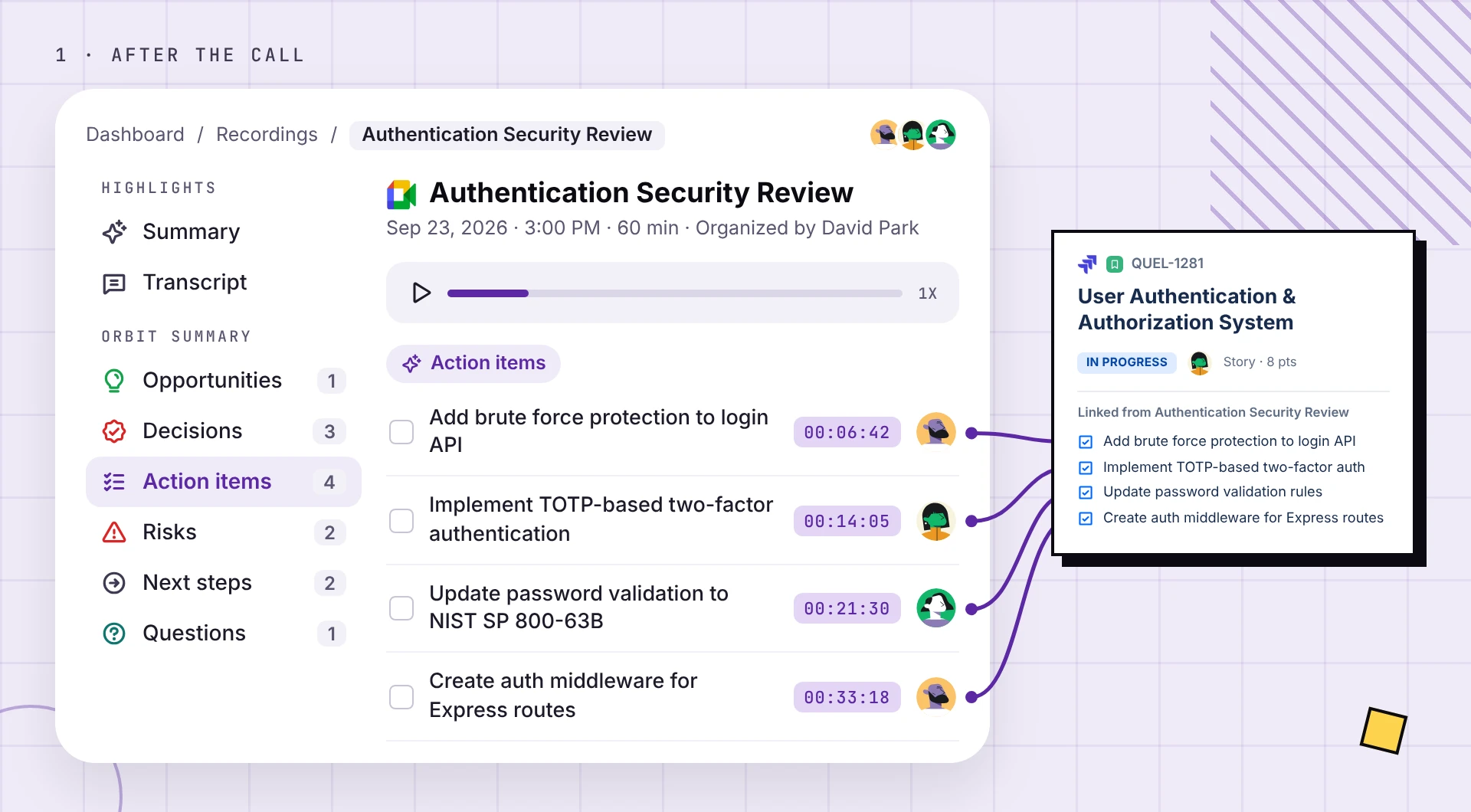
Here is what this looks like in a Quely Space. A team holds a 60-minute Authentication Security Review on Google Meet. Orbit joins the call. After the meeting, Orbit lists the decisions and action items. Each action item shows the minute it was said. For example, "Add brute force protection to login API" was said at 6:42. Each action item is linked to the work item it belongs to, QUEL-1281.
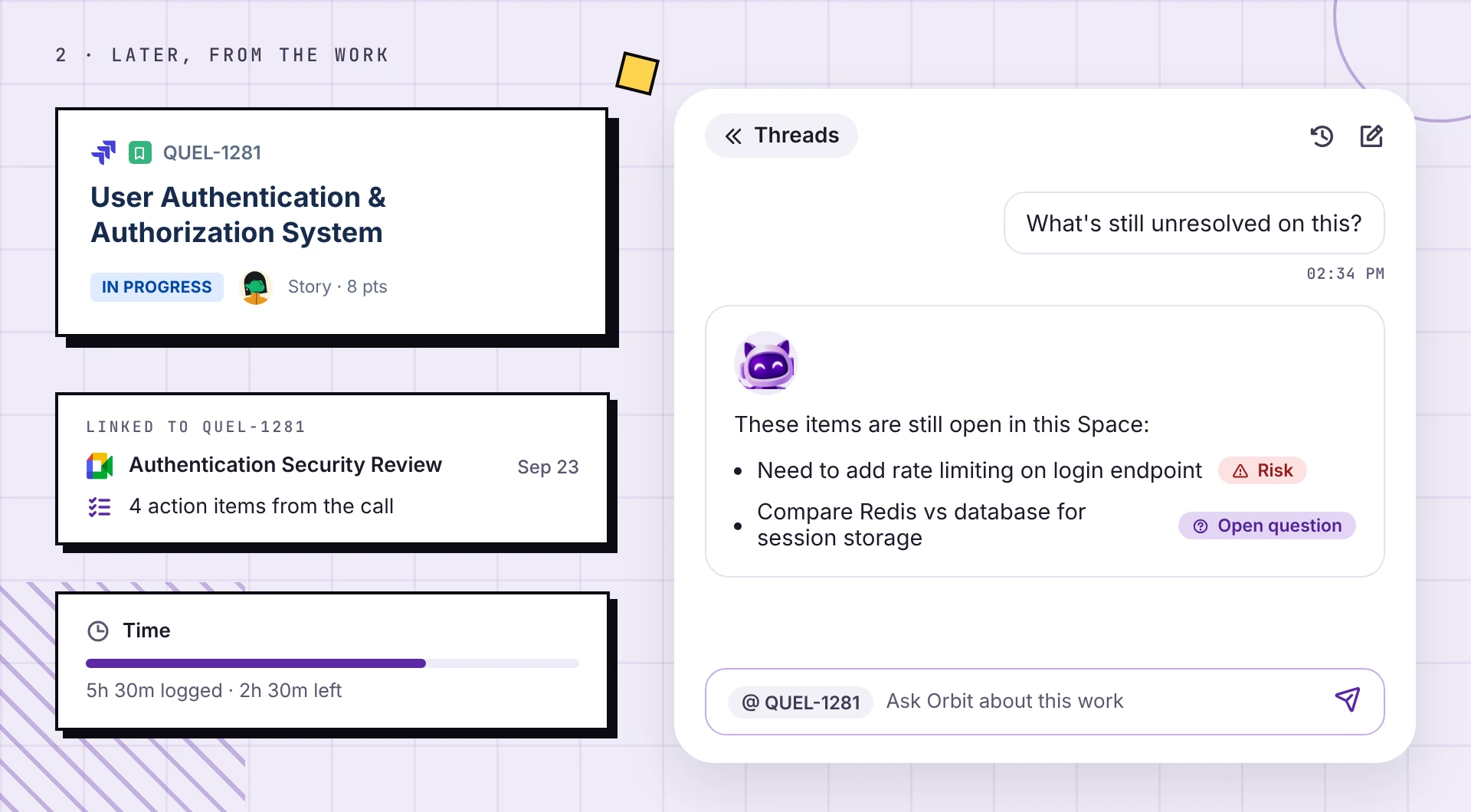
Later, an engineer opens the work and asks Orbit, "What's still unresolved on this?" Orbit answers with the open items: rate limiting on the login endpoint, marked as a risk, and an open question about Redis or a database for session storage. Nobody has to find the recording or ask the person who was in the meeting.
To see the full flow, watch a product manager run a sprint in Quely:
Quely is in a free pilot. Access is by invitation. See pricing.
Book a walkthrough to see how a decision stays next to the work in a Quely Space.
Frequently asked questions
Where should product managers document decisions?
Put a one-line summary on the ticket or epic, and keep the full record in one shared place your team opens daily. Link the two both ways. This keeps the "why" one click from the work.
What is a product decision log?
A product decision log is one list of the choices that changed what the team builds. Each entry has the decision, the date, the owner, the options turned down, and the reason. Guides published in 2026, such as monday.com's, list the same fields.
What should a decision log template include?
Seven columns cover most teams: date, decision, owner, options turned down, reason, linked work, and status. Keep each row short. Put the newest decision at the top.
Should decisions go in the PRD or the Jira ticket?
Both, at different depth. The PRD holds the full reason for a feature. The ticket holds a one-line summary and a link, because the ticket is where engineers work every day.
What is an ADR, and do product teams need one?
An ADR is an architecture decision record, a short file kept in the code repo. Michael Nygard proposed the format in 2011. Product teams can use ADRs for technical choices, but most product decisions need a home that PMs and stakeholders also open.
How do you capture decisions made in meetings?
Write the record the same day, before the meeting notes get filed away. Link it to the tickets the decision changes. Some tools, including Quely's Orbit, can join Google Meet, Teams, and Zoom calls so the meeting material sits next to the work.
How often should a decision log be reviewed?
Once per sprint is a good default for most teams. Mark decisions that changed, with the new date and reason.
Related reading
Find more Quely articles
Choose Quely as a preferred source in Google Search.
Prefer Quely on Google